PureOS Crimson Development Report: December 2025

Purism
Latest posts by Purism (see all)
- PureOS Crimson Development Report: December 2025 - January 13, 2026
- A Quarter Century After Cyberselfish, Big Tech Proves Borsook Right - December 20, 2025
- PureOS Crimson Development Report: November 2025 - December 15, 2025
Fit and finish
“Fit and finish” appears in many industries. For much of the software industry, it refers to features that complete a fit for a target audience, ensuring that audience can use the product for their needs. At a frame shop, it means literally fitting the mounted artwork into a frame, then finishing the back of the frame.
At Purism, fit takes on another meaning – making apps fit on screens the size of the Librem 5.
From the big screen to the small screen
Purism builds the Librem 5 by bringing the full desktop PC environment to a mobile form factor. Phones aren’t fundamentally different from computers, and we believe in empowering users to do everything they can on their PC on their phone as well.
However, PC apps aren’t always tested on phone-size screens, even if they’re designed to be adaptive. GNOME recommends a minimum screen resolution of 1024×600 for desktop. On the other hand, the Librem 5 display is effectively 360×720 at the default 200% scale. GNOME does suggest that apps appropriate for phones should scale down to 360×294, but apps are (understandably) not always tested at such small sizes. We backport fixes when they’ve been fixed upstream. When they haven’t, we try to add value to the ecosystem by identifying and fixing these fit issues, which benefits the entire GNU/Linux ecosystem.
Where did the weekend go?
We found several fit issues in the updated apps present in PureOS Crimson.
GNOME Calendar was particularly painful:
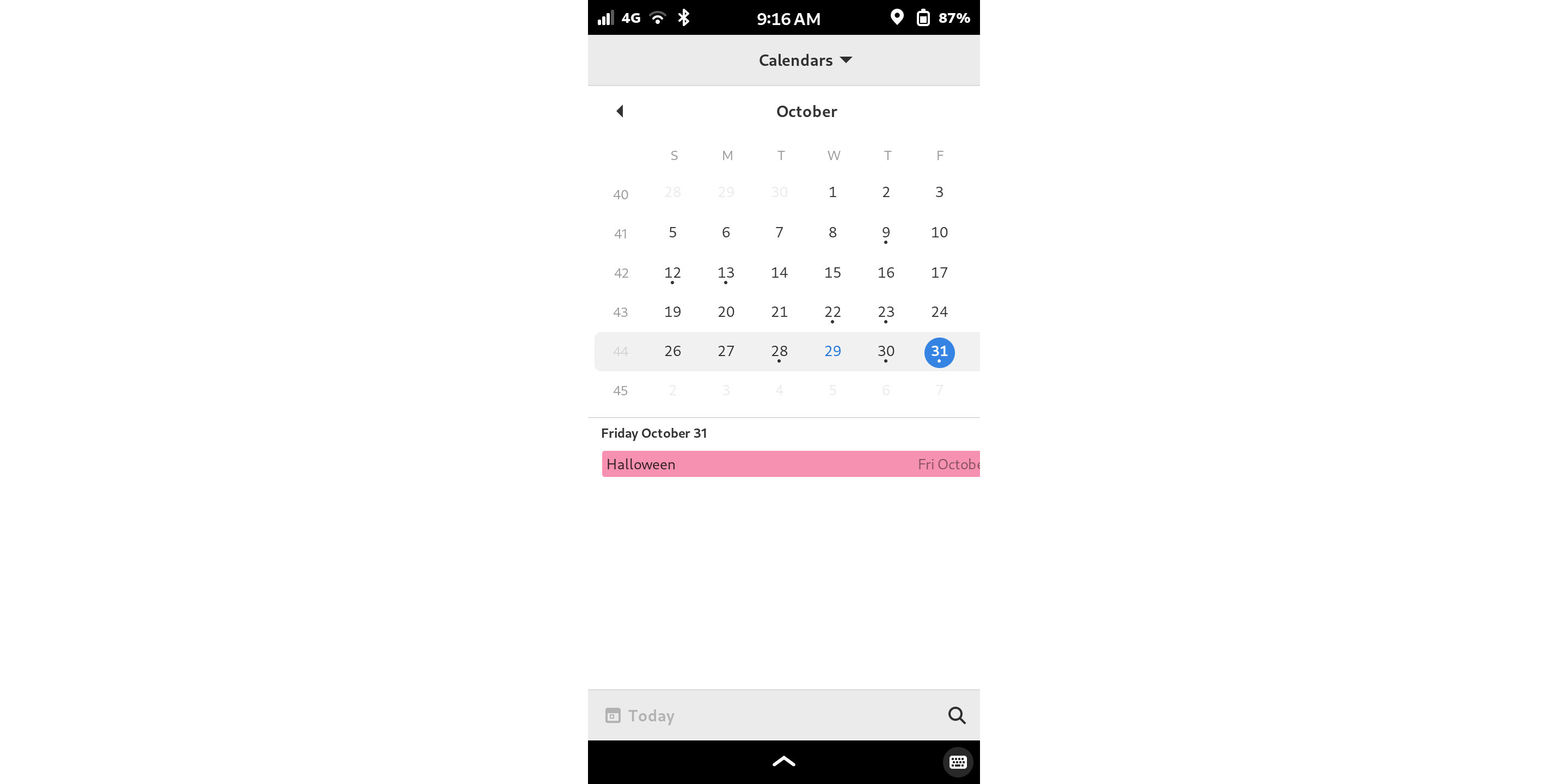
Saturday disappeared! (Or Sunday, if you are Monday-first!) Worse, there is no way to edit events in the small-screen layout. You could only edit events from the month/week views, which are only visible on much wider displays.
The PureOS Store, our distribution of GNOME Software, also had a fit issue any time an error message appeared:
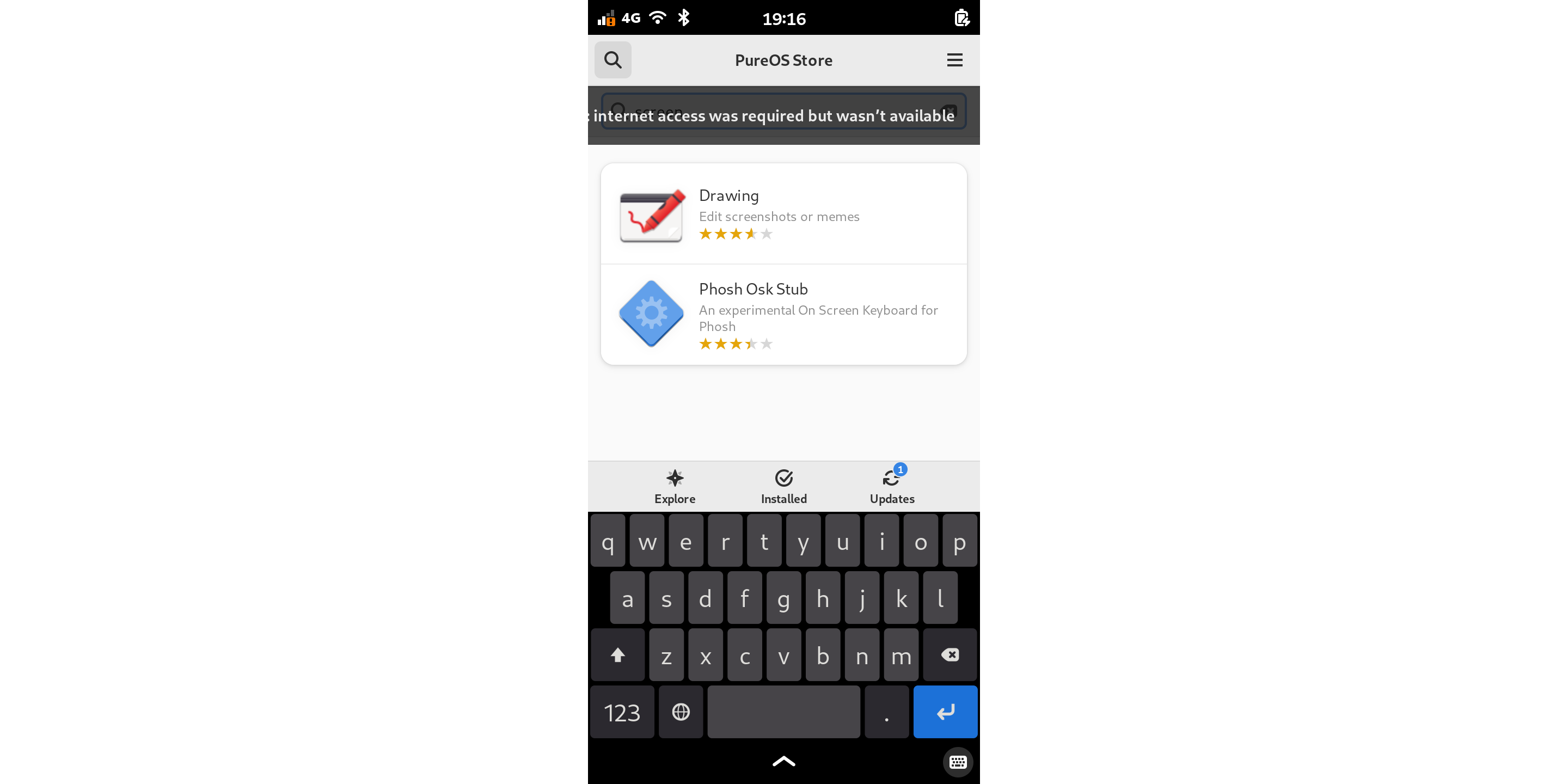
It’s annoying that you can’t read the message, but less obvious is that you also cannot dismiss the message. The button to dismiss it is off the side of the screen.
There was also an obvious issue in Chatty if you tried to tap the message box to move the cursor. While this isn’t directly related to small screens, it still disrupts the mobile experience. This could occur in any GTK4 application, but it was very obvious in Chatty.

The complete picture
GNOME Calendar and GTK4 both had fixes upstream in newer versions, so we backported them to Crimson, and Saturday (or Sunday) is back! We made fixes for the messages in PureOS Store as well.
We also made the file picker fit if the “type of file” description was very long. That happened in the GNOME Text Editor, which uses a relatively long description of the types of files it can open. We updated our patches for Yelp, the GNOME help viewer, so it fits again.
We backported patches for Nautilus (the file manager) and GTK4 so the app chooser fits the screen. When the system asks what program you want to use to open a file, you can see the OK button again!
Fit, meet finish
A lot of other changes occurred besides screen fit as well. PureOS Crimson now includes Livi and Gapless by default on the Librem 5 to play video and audio.
Several packages received maintenance updates. The Librem 5 Linux kernel is updated to 6.6.118. GNOME Calls is updated to 46.3. We also updated xdg-desktop-portal-gtk, a component that allows applications to show GTK dialogs such as file pickers. Applications using SDL2 no longer show a spurious on-screen keyboard. Apt no longer shows warnings when updates affect the udev hardware database, thanks to an update to gmobile. EGL, an API for 3D graphics, works in Flatpak applications again with a fix in Mesa.
Finally, many improvements landed in librem5-base. This is a set of metapackages that bring the whole system together for the Librem 5. The changes fix a host of system integration issues. USB gadgets and Bluetooth services now remain connected through upgrades. PulseAudio again supports Bluetooth, AirPlay, and Avahi. Audio buffering is adjusted for lower latency and to improve compatibility with Waydroid. Applications using OpenAL permit audio device changes at runtime. Bluetooth on SparkLAN cards is now able to use headset and handsfree profiles. Check the full list of changes for even more!
Next time
December’s work focused on wrapping up the long tail of small issues to finish PureOS Crimson for release. In our next update, we’ll return to the key topic from November – upgrading from Byzantium to Crimson. In the mean time, enjoy this sneak peek!
Recent Posts
Related Content
- PureOS Crimson Development Report: December 2025
- PureOS Crimson Development Report: November 2025
- PureOS Crimson Development Report: October 2025
- PureOS Crimson Development Report: September 2025
- Consent On Everything?